GadgetGlowBytes: Your go-to hub for in-depth gadget reviews, breaking tech news, and expert tips to supercharge your everyday tech experience.
A $48 Switch, a $5 Adapter and a $48 Cable Tester: Getting a Home Network to 2.5GbE
Get link
Facebook
X
Pinterest
Email
Other Apps
-
AliExpress Analysis
A $48 Switch, a $5 Adapter and a $48 Cable Tester: Getting a Home Network to 2.5GbE
Three cheap tools that together break the gigabit ceiling — and the three distinct ways each one can disappoint you.
GB
GadgetGlow Bytes Editorial
Published September 15, 2026 · 8 min read · How we work
Affiliate disclosure: this article contains affiliate links. If you buy through them we may earn a small commission at no extra cost to you. That does not change what we recommend — we have not physically tested these products, and everything below is based on published specifications, independent coverage and seller data, all sourced at the end. Prices were checked on September 15, 2026 and change frequently.
For most of gigabit Ethernet's life it was comfortably faster than anything you could plug into it. That stopped being true around the moment a mid-range NVMe drive in a cheap network enclosure could saturate a 1 Gb link four times over, and a Wi-Fi 7 access point started handing out more wireless throughput than its own uplink could carry. The bottleneck moved. It is now the switch in the cupboard.
The honest jump from here is not 10 Gigabit, which runs hot, needs fans, and costs enough that it only makes sense if you already know why you want it. The jump is 2.5GbE — two and a half times the bandwidth, over the Cat5e already in your walls, at low enough power that the hardware stays fanless and silent.
This post is for someone with a NAS or a home lab who has noticed a transfer sitting stubbornly at 112 MB/s and does not want to spend four hundred dollars finding out whether the problem is worth solving. One box moves the packets, one dongle gets a laptop onto the faster network without opening it, and one tester tells you whether the cable in the wall can carry the traffic before you blame the switch. Roughly a hundred dollars for all three — and three entirely different failure modes, which is the more useful half of the story.
The three, side by side
Product
AliExpress price
Branded alternative
Shipping
Warranty
HORACO 8-port 2.5GbE switch, 2× 10G SFP+
~$48
TP-Link TL-SG108-M2, ~$55
6–20 days
Dispute window only, no local RMA
Generic USB 3.0 / USB-C 2.5GbE adapter
~$5
UGREEN 2.5GbE, ~$21
8–25 days
Effectively disposable
NOYAFA NF-8209 tester and toner
~$48
Klein Scout Pro 3 Locator Kit, ~$200
8–20 days
Seller-dependent, rarely honoured
Compiled by GadgetGlow Bytes. Prices verified September 15, 2026. AliExpress figures were listed in Brazilian reais on the regional storefront and converted at roughly 5.12 BRL to the dollar; your storefront, coupons and shipping method will move them.
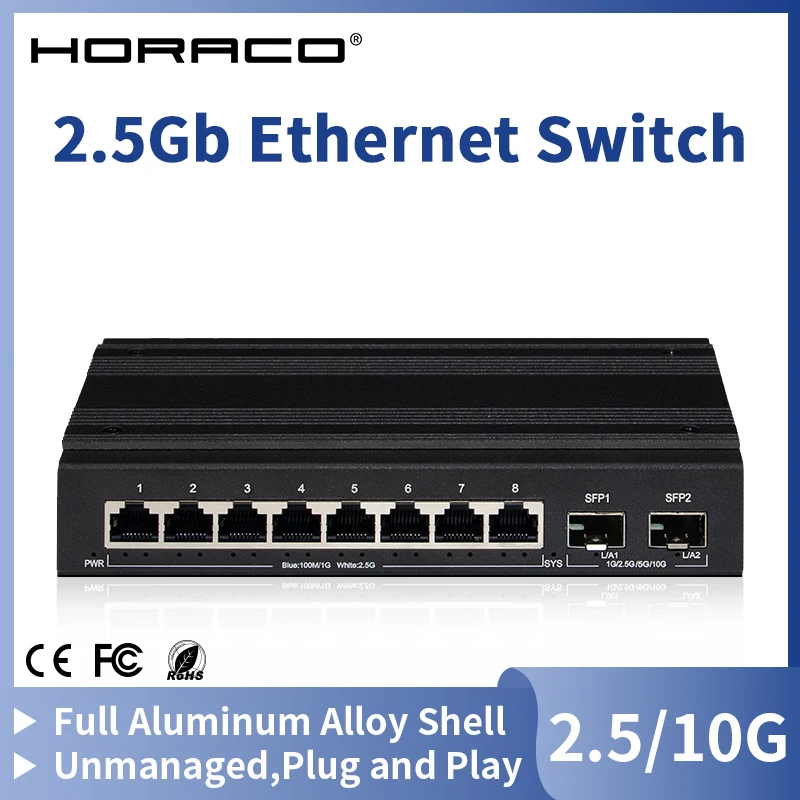
1. HORACO 8-Port 2.5GbE Switch with Dual 10G SFP+
Seller image, AliExpress
~$48 · checked September 15, 2026
Eight 2.5GBASE-T copper ports and two SFP+ cages that will do 10 Gb, in a fanless metal case, unmanaged and plug-and-play. No web interface, no VLANs, no firmware to update — you put power into it and it forwards frames. For a home network that is the right amount of complexity, and the absence of a management plane is one fewer thing a vendor can abandon.
The SFP+ cages are what make this class of box interesting rather than merely cheap: they let you uplink to a NAS or a second switch at 10 Gb without buying a 10 Gb switch. ServeTheHome, which has reviewed dozens of these white-label units individually and maintains a buyer's guide covering more than forty models, reviewed a HORACO 8-port 2.5GbE unit with a 10GbE uplink under $100 and treats the category as legitimately usable rather than a novelty.
Who it's for — and who should skip it
For anyone with a NAS, a mini PC or two, and a gigabit switch they have outgrown, this is the least painful upgrade available. Skip it if you need VLANs, link aggregation or PoE — buying the cheap one now and the managed one later costs more than buying the managed one now. Skip it also if it will live in a rack you cannot easily reach: an unmanaged fanless box has no way to tell you it is in trouble.
The risks
Shipping: roughly 8–20 days on standard post, with most buyers reporting 18–22; the platform's Choice option is 6–12 days and a local-warehouse listing 2–7.
Warranty: there is no meaningful one. Buyer Protection gives a 75-day window for non-delivery and 15 days after delivery to open a dispute. A switch that dies in month seven is simply dead.
Variance: this is a white-label market. Boxes that look identical from different sellers can use different Realtek silicon, power supplies and heatsinking — which is precisely why the useful reviews are model-by-model rather than category-wide. A fanless case that gets warm with all eight ports loaded is normal; one you cannot hold your hand on is not.
The alternative
The TP-Link TL-SG108-M2 is eight 2.5GbE ports, unmanaged and fanless, listed at about $55 on Amazon as of late August 2026 — roughly seven dollars more, with no SFP+ cages but with a limited lifetime warranty and a support line in your own country. Pay the difference. The only reason to choose the AliExpress unit is the pair of 10G uplinks, which TP-Link does not offer at this price. If you do not need fibre or a DAC to a NAS, the branded switch wins clearly, and that is not a sentence we write often in these posts.
A five-dollar dongle that puts a 2.5 Gb port on anything with a spare USB 3.0 socket. Inside almost every one of these, whatever the name on the shell, is a Realtek RTL8156 or RTL8156B — a single chip doing the USB bridging and the Ethernet PHY together, drawing well under two watts, supported out of the box by current Windows, macOS and Linux kernels.
That sameness is the point. Independent testing repeatedly finds RTL8156B adapters landing within a couple of percent of one another at around 2.3 Gbit/s in iperf, close to the practical ceiling for the standard; ServeTheHome reviewed branded versions from UGREEN, ASUS and smaller vendors and arrived at the same figure each time. In throughput terms, the twenty-dollar adapter and the five-dollar adapter are frequently the same device in different plastic.
Who it's for — and who should skip it
Right for a laptop, a mini PC, a Raspberry Pi 5 or an older desktop stuck at gigabit — anywhere opening the case is not worth it. Skip it on a USB 2.0 machine, where you get gigabit at best; skip it for a server or anything that must stay up unattended, because a USB NIC adds a bus, a connector and a driver stack to a link that was a soldered PCIe device; and skip it if you need Wake-on-LAN or PXE boot, which USB adapters support inconsistently.
The risks
Shipping: 8–25 days on standard post. At this price nobody pays for expedited shipping, and nobody should.
The chip lottery: listings routinely say "2500Mbps" and nothing else. The older RTL8156 stepping had documented sleep bugs and packet drops that the B revision fixed, and you will not know which you received until you read the device ID.
Driver history: early Realtek drivers left the bridge chip at full power instead of enabling eco mode, causing overheating; CNX Software documented the problem and the fix on Ubuntu. Modern kernels handle it, but an adapter shipped with a 2021 driver mini-CD is a warning, not a bonus.
Warranty: none worth the postage. Treat it as a consumable and buy two.
The alternative
UGREEN's 2.5GbE adapter sells for around $21, ASUS's USB-C2500 for roughly $40. Both use the same Realtek silicon and measured at the same throughput, so you are paying for an aluminium shell, a strain-relieved cable, a named driver page and someone to email. For a work laptop or a travelling kit — anywhere an intermittent NIC costs you an afternoon — that is fair value for the mechanical build alone, because the failure mode on the cheap ones is almost always the cable joint rather than the chip. For a spare desktop in the corner, it is not.
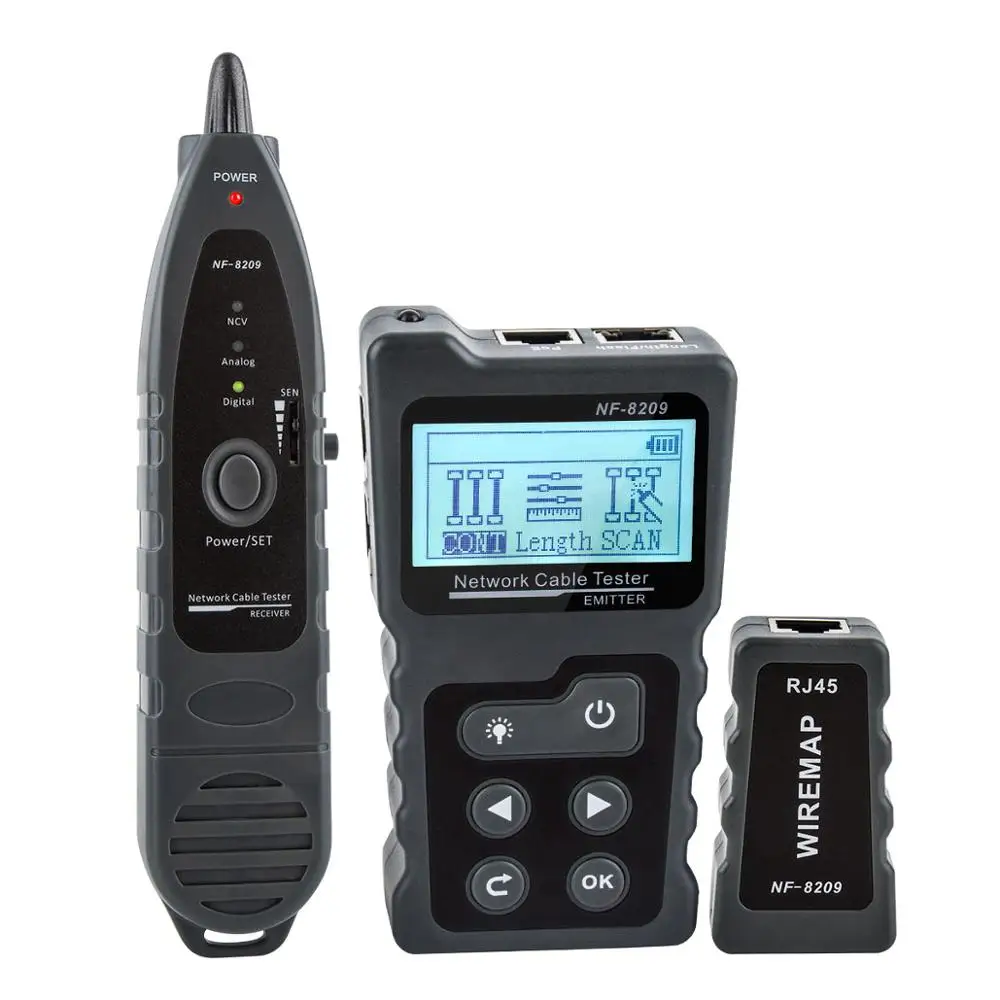
An LCD handset and a tone probe that between them answer the four questions you actually have about a cable in a wall: is it wired correctly pin-to-pin, how long is it, which of the eleven identical white cables in the patch panel is it, and is there voltage on it. The wiremap catches split pairs and crossed conductors a continuity beeper misses; length measurement runs from roughly 2 to 200 metres; the PoE side detects up to 60V DC, identifies 802.3af, 802.3at or non-standard sources, and reports polarity and power-supply mode.
This is the tool that turns "my 2.5GbE link keeps falling back to gigabit" from a guess into a diagnosis. Cat5e carries 2.5GBASE-T comfortably over a normal household run, but a punchdown with a split pair, a kink from a badly pulled run, or a cable forty metres longer than you thought will all surface as negotiation failures rather than obvious faults. An independent hands-on test published on epanorama.net found the unit did what it claimed on wiremap and tracing.
Who it's for — and who should skip it
Buy it if you have structured cabling you did not install yourself, or are about to run some. Skip it entirely if your network is four patch cables between a router and a desk — at that scale swapping the cable is the test, and forty-eight dollars buys a lot of Cat6 leads. Skip it too if you need certification results to hand a client: this is a diagnostic tool, not a cable certifier, and it produces no report anyone will accept as proof a run meets a category standard.
The risks
Shipping: 8–20 days standard. A boxed kit containing a battery, which occasionally slows it further at customs.
Counterfeits: the highest risk of the three. A meaningful share of listings spell the brand "Nayafa" rather than NOYAFA, and prices for nominally the same handset run from about $48 to over $130. Match the model number and case moulding against the manufacturer's own product page before ordering.
Accuracy caveats: length figures depend on the cable's velocity of propagation, and the handset assumes a typical value unless calibrated. Sellers quote ±1.6 m, or "98%", or "99%" — three claims for one device, which tells you how seriously to take any. Calibrate once against a run you have measured with a tape.
Warranty: nominally offered by some sellers, realistically limited to the dispute window.
The alternative
Klein Tools' Scout Pro 3 with the Locator Remote Kit runs about $200. It does less on paper — no PoE voltage readout — but it is built to be dropped off a ladder, its remotes are numbered so you can map several runs in one pass, and it is backed by a company with a warranty department. If the tool is going in a van rather than a drawer, the four-fold price difference buys durability that matters more than the feature list. If it comes out twice a year, it does not.
Shipping is the tax you pay. Standard shipping runs roughly 8–20 days, with a large share of buyers reporting 18–22. The platform's Choice programme is 6–12 days, local-warehouse listings can arrive in 2–7, and expedited couriers land in 4–9 at a price that usually erases the saving. Read where the item actually ships from, not where the seller is registered.
Customs depends entirely on where you live. In the UK, EU and Australia, VAT or GST is collected at checkout under IOSS-style schemes, so there is normally nothing to pay on the doorstep. In the US and Canada, some orders attract duties on arrival. Buyer Protection explicitly does not cover import charges or delays caused by your own customs authority.
The warranty is a clock, not a promise. Buyer Protection gives a 75-day window for non-delivery and 15 days after delivery to open a dispute. Miss the second window and the order closes permanently. No repair, no replacement in month eight, no phone number.
Read seller ratings the right way. Scores above 95% are close to meaningless — almost every active seller has one. What informs is the raw number of units sold on that specific listing, the listing's age, and whether negative reviews describe the same defect repeatedly. Buyer photographs are worth more than the star count, because they show what actually arrived.
If it arrives broken, act immediately. Photograph the parcel before opening it fully and the item before plugging it in, then open the dispute inside the 15-day window with those photographs attached. A partial refund is usually offered first and you are not obliged to accept it. Do not accept an offer to "resend" outside the protection window — that resets nothing and the clock keeps running.
Our Read
The adapter is the easy yes. A five-dollar dongle built around a chip independent testers have benchmarked repeatedly, at the same throughput as the twenty-dollar version, is exactly what this platform is good at: a commodity part where the brand adds a shell and little else. Buy two.
The switch is the one we would skip, and that surprised us. TP-Link's eight-port 2.5GbE unmanaged switch is about seven dollars more with a limited lifetime warranty behind it, and seven dollars is not a real saving on a device that sits powered on in a cupboard for five years. The AliExpress box earns its place only if you specifically want the pair of 10G SFP+ cages — a genuine capability gap at this price, but a narrower reason than "it's cheaper".
The tester is where the price gap is real: a quarter the cost of a Klein kit, for a tool most people use twice a year. Worth it for a homelab, not for a van — and it carries the highest counterfeit risk of the three.
What we still don't know: we have not handled these units. Only hands-on use would tell you how hot the switch runs with all eight copper ports saturated and whether it throttles, which silicon revision the adapter you receive actually contains, and whether the tester's length readings hold up against a known reference run. Those are the three things that separate a good unit from a bad one here, and no specification sheet answers them.
Top 3 Best-Selling Mini PCs on AliExpress in 2025 – Which One Is Worth It? Hey everyone! In today’s post, we’re diving into the top 3 best-selling mini PCs on AliExpress up until June 2025. We'll take a close look at their advantages, disadvantages, performance, and even some of the funniest (and most helpful) customer reviews. If you’re looking for a compact, affordable, and surprisingly powerful mini computer, this post is for you. Let’s start with the first one on our list: the famous GMKtec G3 . According to AliExpress, this model has already sold over 10,000 units — and it’s not hard to see why. It comes with an Intel Alder Lake N100 processor , reaching up to 3.4 GHz, and is available with 8 GB or 16 GB of DDR4 RAM , and a 256 GB or 512 GB M.2 PCIe SSD , depending on the version you choose. Aliexpress Link: https://s.click.aliexpress.com/e/_oC43Wwa One standout feature is its two HDMI 2.0 ports , allowing you to connect dual 4K moni...
Best tablet controller for iPad Pro 13-inch, the Razer Kishi V3 Pro XL snaps onto larger tablets to deliver console-level comfort and precision for cloud gaming and native apps. Design & Compatibility Built from anodized aluminum and reinforced polymer, the Kishi V3 Pro XL stretches to fit iPad Pro and Air models up to 13” as well as Android tablets with USB-C from 10” to 13”. Its full-size thumbsticks feature drift-free TMR sensors, Hall Effect triggers ensure instant responsiveness, and a USB-C passthrough keeps you powered through marathon sessions. Two programmable rear macros round out the controls for custom loadout shortcuts. For IPAD: https://amzn.to/4kLrG9c For Iphone: https://amzn.to/4eaKYlS Evolving from the Smartphone Version Where the standard Razer Kishi V3 Pro handled screens up to 8”, the XL ups the ante with beefier grips, premium finishes and seamless support for full-size tablets without sacrificing haptic feedback on Android or PC remote-play...
Introduction: Buckle Up, Buttercup – Tech is Sprinting! Technology isn't just advancing; it's absolutely sprinting! Every day, new innovations reshape how we live, work, and even dream. Forget yesterday's headlines; we're in a whirlwind of groundbreaking news that's shaping our present and designing our future. Ready to dive into the biggest tech stories that have everyone talking? 1. The AI Avalanche: Friend, Foe, or Future Boss? The Rise of the Machines (That Think!): AI isn't just for sci-fi anymore; it's the undisputed heavyweight champion of tech news, making waves everywhere. Generative AI: Creativity on Demand: Imagine an AI that creates stunning art, writes compelling stories, or even crafts complex code – all from a simple prompt. This is Generative AI, and it's already transforming creative industries, customer service, and software development, making innovation faster than ever. It's the reason your new marketing campaign feels almost...



Comments
Post a Comment